



Example: ticketing
Let’s build the path from choosing seats to entering a concert. We will add a programme, reserve a group, expire unpaid holds, accept payments and issue tickets. Then we will add delivery, admission, transfers, refunds and the organizer’s tools.
View on GitHub
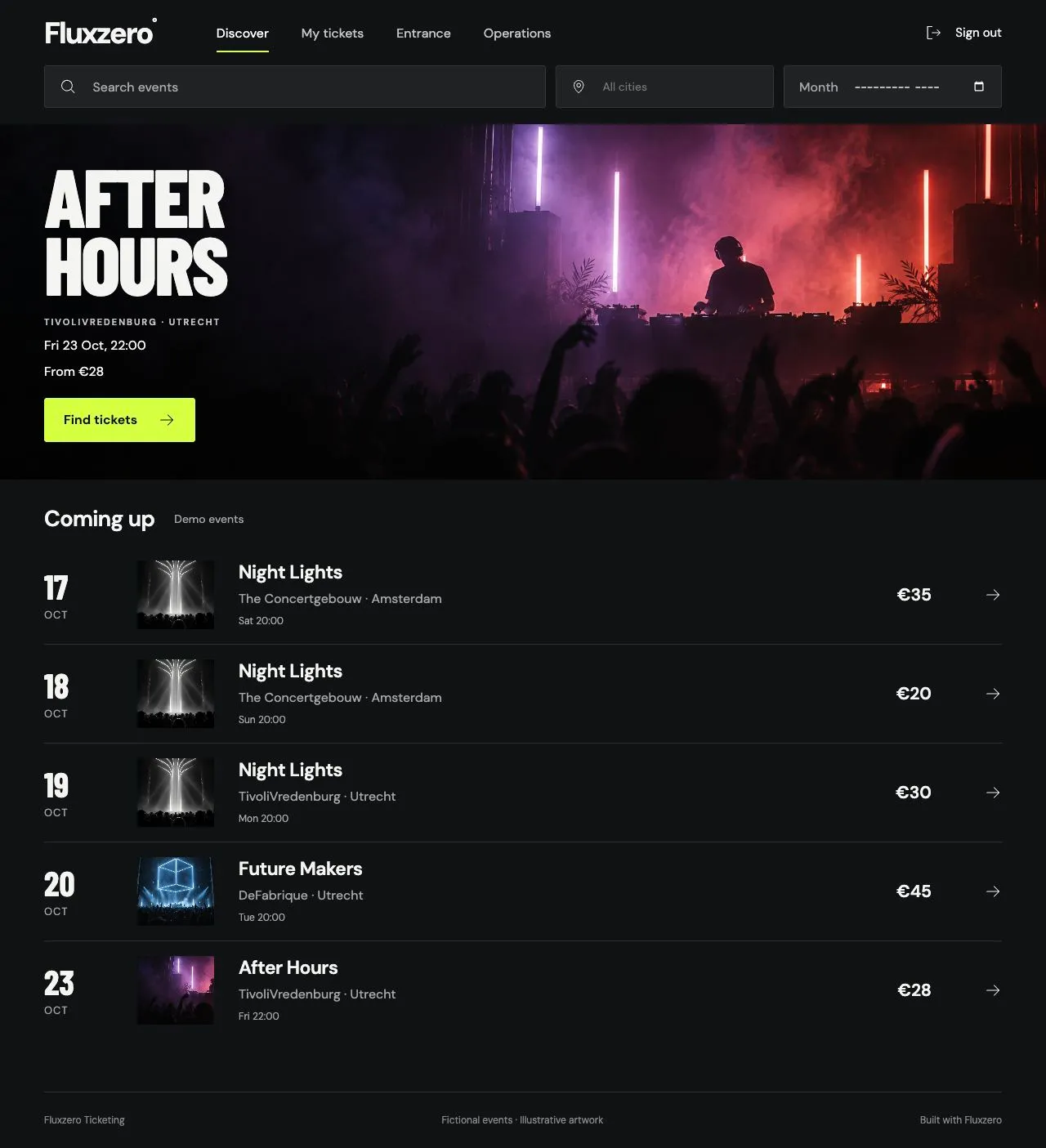
The completed Ticketing app, showing its demo programme.
This continues Building your first app. The new challenge is coordinating several independent lifecycles: a reservation can expire while a payment is still in progress, and a ticket can change owner without changing the original purchase.
Work through the app
Section titled “Work through the app”Use the current example as your working project:
git clone https://github.com/fluxzero-io/fluxzero-sample-ticketing.gitcd fluxzero-sample-ticketingfz devRebuild the classes and methods below in their existing files. The checkout supplies the completed solution, value types, session setup and React screens; source links show the full files around each excerpt. The Kotlin tabs use the example’s Java model and value types, so you can concentrate on each new behavior.
First try Night Lights: choose two places in the Recital Hall and reserve them. Sign in as demo-organizer to explore Operations and Entrance. The local profile can complete a box-office sale with a demo cash receipt; online Stripe checkout is a separate integration step later in this tutorial.
Build the programme and seating layout
Section titled “Build the programme and seating layout”Start with places and performances. A Venue owns Halls. Each hall has versioned SeatingPlans containing
sections and seats. An Event describes the show; a Performance puts it at a particular time in a particular plan.
Implement Performance with two parent relationships:
@Model(persistence = {ModelPersistence.EVENT_SOURCED,        ModelPersistence.DOCUMENT})@Withpublic record Performance(@EntityId PerformanceId performanceId,                          @Parent(pathInParent = "performances") EventId eventId,                          @Parent(pathInParent = "performances") SeatingPlanId seatingPlanId,                          PerformanceDetails details, Cancellation cancellation) {
    public enum Cancellation { NONE, SETTLING, SETTLED }    public boolean cancelled() { return cancellation != Cancellation.NONE; }}
@Model(persistence = [ModelPersistence.EVENT_SOURCED, ModelPersistence.DOCUMENT])data class Performance( @EntityId val performanceId: PerformanceId, @Parent(pathInParent = "performances") val eventId: EventId, @Parent(pathInParent = "performances") val seatingPlanId: SeatingPlanId, val details: PerformanceDetails, val cancellation: Cancellation) { enum class Cancellation { NONE, SETTLING, SETTLED } fun cancelled() = cancellation != Cancellation.NONE}The same performance is reachable through its show and its seating plan. It still has one identity and history.
Use the existing CreateVenue, CreateHall, RegisterSeatingPlan and CreateEvent commands to establish those
parents, then implement SchedulePerformance. Its application method creates the performance;
its rule requires a future start and a price for every section in the selected plan.
Keep the seating plan immutable once registered. Seats, adjacency and wheelchair/companion links belong to that layout. Prices and available ticket types belong to the performance. This lets two dates use the same hall at different prices without changing either date’s layout.
Show the programme
Section titled “Show the programme”Implement GetProgramme around a paged search for Performances. Search through the Event
parent for a title and through the Venue ancestor for a city. Start with these lines from its query handler:
var search = Fluxzero.search(Performance.class);if (term != null && !term.isBlank()) { search = search.whereParent(Event.class, lookAhead(term, "details/title"));}if (city != null && !city.isBlank()) { search = search.whereAncestor(Venue.class, match(city, true, "details/city"));}var items = search.sortBy("details/startsAt").sortBy("performanceId") .skip(offset).fetch(limit + 1);var search = Fluxzero.search(Performance::class.java)if (!term.isNullOrBlank()) { search = search.whereParent(Event::class.java, lookAhead(term, "details/title"))}if (!city.isNullOrBlank()) { search = search.whereAncestor(Venue::class.java, match(city, true, "details/city"))}val items = search.sortBy("details/startsAt").sortBy("performanceId") .skip(offset).fetch(limit + 1)Return at most limit results and use the extra result to determine hasMore. Complete the result mapping with
the show’s title, venue and layout summary. The seat map itself is loaded when the customer opens a performance.
Check: open frontend/src/Discover.jsx, connect its filters to the catalogue endpoint and search by title and
city. The programme should contain performances, not one result per reservation or seat.
DemoCatalog supplies the small test venues and the demo programme.
Make availability a view of inventory
Section titled “Make availability a view of inventory”Add SeatInventory for each numbered seat and SectionInventory for standing capacity. Both belong to a
performance. They represent occupancy; the seating plan remains the layout.
In SeatInventory, the central decision is small:
public boolean occupiedAt(Instant now) { return productionHoldId != null || reservationId != null && (sold || now.isBefore(expiresAt));}fun occupiedAt(now: Instant): Boolean = productionHoldId != null || reservationId != null && (sold || now.isBefore(expiresAt))A seat is occupied by a production block, a completed sale or a hold whose deadline is still in the future. GetAvailability turns that into remaining quantities per section; GetSeats supplies a bounded portion of the numbered layout.
Offer useful seat choices
Section titled “Offer useful seat choices”Implement GetSeatSuggestions by following the plan’s nextSeatId links for adjacent seats.
Keep suggestions as queries: a suggestion helps the customer choose but does not reserve anything.
ReservationRules checks the submitted group, including wheelchair/companion relationships
and ticket-type eligibility, when the customer actually reserves.
Wire frontend/src/SeatMap.jsx to those queries. Select two adjacent places, then select a discounted ticket type
for one visitor. Both ticket types still occupy the same physical stock. The reservation will freeze each price
so later financial operations can use the price actually paid.
Reserve the whole group together
Section titled “Reserve the whole group together”A reservation owns the buyer’s selection, frozen admissions and prices, creation time, deadline and status.
Implement ReserveTickets as an @InterceptApply decision. After checking the sales window
and selection, it returns the reservation and all required inventory changes together.
These are the final lines of its decide method, after it has constructed reservation:
var changes = new ArrayList<Object>();changes.add(new ReservationHeld(reservationId, reservation));changes.addAll(InventoryChanges.hold(reservation, performance, now));return changes;return buildList<Any> { add(ReservationHeld(reservationId, reservation)) addAll(InventoryChanges.hold(reservation, performance, now))}Implement InventoryChanges to produce one ChangeSeatInventory for each numbered seat,
or a count change for a standing section. The inventory command checks whether its current stock can accept
the hold. Because those changes are one Model operation, a failure at the last seat also rolls back the first.
Keep ReservationHeld and the inventory changes internal with automaticHandling = DISABLED: clients submit
ReserveTickets, which owns the complete decision.
Check a competing booking
Section titled “Check a competing booking”Add a TicketingTutorialTest that extends TicketingTestSupport. Its fixture(false) creates
the small test catalogue at NOW; seats(id, ...) builds a selection in SHOW. ALICE, BOB and OPERATOR are
fixture users. Keep the test catalogue: its A1/A2/B1/B2 seats make the outcomes easy to inspect.
Reserve A2 for Alice, then let Bob request B1 and A2:
@Testvoid wholeGroup() { var rejected = new ReservationId("bob-rejected"); fixture(false).givenCommandsByUser(ALICE, seats(R, "A2")) .whenCommandByUser(BOB, seats(rejected, "B1", "A2")) .expectExceptionalResult(IllegalCommandException.class) .expectThat(f -> assertNull(Fluxzero.loadModel(rejected).get())) .andThen().whenCommandByUser(BOB, seats(new ReservationId("bob-order"), "B1", "B2")) .expectSuccessfulResult();}@Testfun wholeGroup() { val rejected = ReservationId("bob-rejected") fixture(false).givenCommandsByUser(ALICE, seats(R, "A2")) .whenCommandByUser(BOB, seats(rejected, "B1", "A2")) .expectExceptionalResult(IllegalCommandException::class.java) .expectThat { assertNull(Fluxzero.loadModel(rejected).get()) } .andThen().whenCommandByUser(BOB, seats(ReservationId("bob-order"), "B1", "B2")) .expectSuccessfulResult()}The final booking proves that the failed attempt did not leave B1 occupied. Repeat the same idea with standing
capacity: reserve four places in the six-place test section, reject a group of three, then accept a group of two.
floor(id, count) in the test support constructs those standing selections.
Release an unpaid reservation
Section titled “Release an unpaid reservation”A hold lasts fifteen minutes, capped at the performance start. Store that deadline on the reservation and add
ReservationDeadlines as a handler. It schedules an owned expiry command for the current hold and cancels it when
the reservation leaves HELD.
Implement the expiry command itself:
@NoUserRequiredpublic record ExpireReservation(@Parent @NotNull ReservationId reservationId) { @InterceptApply Object ignoreStale(@Nullable Reservation reservation) { return reservation != null && reservation.status() == ReservationStatus.HELD && !Fluxzero.currentTime().isBefore(reservation.expiresAt()) ? this : null; } @Apply Reservation apply(Reservation reservation) { return reservation.withStatus(ReservationStatus.EXPIRED); }}@NoUserRequireddata class ExpireReservation(@Parent @field:NotNull val reservationId: ReservationId) { @InterceptApply fun ignoreStale(@Nullable reservation: Reservation?): Any? = if (reservation != null && reservation.status() == ReservationStatus.HELD && !Fluxzero.currentTime().isBefore(reservation.expiresAt())) this else null
@Apply fun apply(reservation: Reservation): Reservation = reservation.withStatus(ReservationStatus.EXPIRED)}The inventory already tests the deadline when deciding whether stock is occupied. Availability therefore does not depend on a timer arriving at precisely the deadline. The scheduled command updates the reservation’s status.
Advance time and book the same seat again:
@Testvoid expiry() { fixture(false).givenCommandsByUser(ALICE, seats(R, "A1")) .whenTimeElapses(Duration.ofMinutes(15)) .expectThat(f -> assertEquals(ReservationStatus.EXPIRED, reservation().status())) .andThen().whenCommandByUser(BOB, seats(new ReservationId("bob-order"), "A1")) .expectSuccessfulResult();}@Testfun expiry() { fixture(false).givenCommandsByUser(ALICE, seats(R, "A1")) .whenTimeElapses(Duration.ofMinutes(15)) .expectThat { assertEquals(ReservationStatus.EXPIRED, reservation().status()) } .andThen().whenCommandByUser(BOB, seats(ReservationId("bob-order"), "A1")) .expectSuccessfulResult()}Record payment and issue tickets
Section titled “Record payment and issue tickets”Give Payment its own Model under Reservation. A payment attempt can fail, succeed or need a refund independently of whether the reservation still holds its places.
Implement StartPayment to check ownership and an active online hold, then create a pending
payment for the reservation’s total. Only the payment integration may report money received. In
RecordPaymentSuccess, first recognize a repeated confirmation, then decide whether this capture can still
confirm the reservation:
@NotNull @Valid Money amount) { @InterceptApply Object decide(Payment payment, Reservation reservation, Performance performance) { if (payment.captured() != null) { require(payment.captureReference().equals(captureReference) && payment.captured().equals(amount), "Conflicting payment confirmation"); return null; } Instant receivedAt = Fluxzero.currentTime(); boolean accepted = reservation.holdsAt(receivedAt) && amount.equals(payment.expected()); accepted = accepted && !performance.cancelled() && receivedAt.isBefore(performance.details().startsAt()); var capture = new PaymentCaptured(paymentId, reservation.reservationId(), captureReference, amount, receivedAt, accepted); var changes = new ArrayList<Object>(); changes.add(capture); if (accepted) changes.addAll(InventoryChanges.sell(reservation, performance, receivedAt)); return changes; }}@InterceptApplyfun decide(payment: Payment, reservation: Reservation, performance: Performance): Any? { if (payment.captured() != null) { require(payment.captureReference() == captureReference && payment.captured() == amount, "Conflicting payment confirmation") return null } val receivedAt = Fluxzero.currentTime() val accepted = reservation.holdsAt(receivedAt) && amount == payment.expected() && !performance.cancelled() && receivedAt.isBefore(performance.details().startsAt()) return buildList<Any> { add(PaymentCaptured(paymentId, reservation.reservationId(), captureReference, amount, receivedAt, accepted)) if (accepted) addAll(InventoryChanges.sell(reservation, performance, receivedAt)) }}Implement the @Apply methods on PaymentCaptured together: record the captured money,
confirm the reservation if accepted, and create one Ticket per admission. If it cannot be accepted, retain the
capture and create a refund obligation instead. Do not erase a financial fact because its reservation expired.
The fixture’s pending(false) reserves A1/A2 and starts their €70 payment. success() reports that exact amount:
@Testvoid issueTickets() {    pending(false).whenCommandByUser(PAYMENTS, success())        .expectSuccessfulResult()        .expectNoSchedules()        .expectThat(f -> {            assertEquals(ReservationStatus.CONFIRMED, reservation().status());            assertEquals(2, Fluxzero.loadGraph(R).childModels(Ticket.class).size());        });}
@Testvoid latePayment() { pending(false).givenElapsedTime(Duration.ofMinutes(15)) .givenCommandsByUser(BOB, seats(new ReservationId("replacement"), "A1", "A2")) .whenCommandByUser(PAYMENTS, success()) .expectThat(f -> { assertEquals(PaymentStatus.REFUND_REQUIRED, payment().status()); assertTrue(Fluxzero.loadGraph(R).childModels(Ticket.class).isEmpty()); });}@Testfun issueTickets() { pending(false).whenCommandByUser(PAYMENTS, success()) .expectSuccessfulResult() .expectNoSchedules() .expectThat { assertEquals(ReservationStatus.CONFIRMED, reservation().status()) assertEquals(2, Fluxzero.loadGraph(R).childModels(Ticket::class.java).size) }}
@Testfun latePayment() { pending(false).givenElapsedTime(Duration.ofMinutes(15)) .givenCommandsByUser(BOB, seats(ReservationId("replacement"), "A1", "A2")) .whenCommandByUser(PAYMENTS, success()) .expectThat { assertEquals(PaymentStatus.REFUND_REQUIRED, payment().status()) assertTrue(Fluxzero.loadGraph(R).childModels(Ticket::class.java).isEmpty()) }}Connect checkout to Stripe
Section titled “Connect checkout to Stripe”The booking rules now work without a payment provider. Add the adapter in payment/stripe with the existing
BeginStripePayment entry point. It starts the payment and records a provider-work request.
Use StripePaymentProcess, a @Stateful handler associated with PaymentId, to remember
which provider operation is in progress. StripePaymentEffects reacts to that stored state and sends the next
command or query. The provider attempt is separate from the business payment we just built.
Create the external request
Section titled “Create the external request”Implement CreateStripeIntent using SendToStripe, the app’s shared authentication and request conventions:
@LocalOnly @RequiresAnyRole("PAYMENTS")public record CreateStripeIntent(PaymentId paymentId, Money amount, String operationKey) implements SendToStripe<StripeIntent> {    @HandleCommand StripeIntent handle() { return StripeIntent.from(send()); }
@Override public WebRequest.Builder request() { return WebRequest.post("https://api.stripe.com/v1/payment_intents") .contentType("application/x-www-form-urlencoded") .body(form(Map.of("amount", Long.toString(amount.minorUnits()), "currency", "eur", "payment_method_types[]", "card", "capture_method", "automatic", "metadata[payment_id]", paymentId.getFunctionalId(), "metadata[operation_key]", operationKey))); }}@LocalOnly@RequiresAnyRole("PAYMENTS")data class CreateStripeIntent( private val paymentId: PaymentId, val amount: Money, private val operationKey: String) : SendToStripe<StripeIntent> { override fun operationKey() = operationKey
@HandleCommand fun handle(): StripeIntent = StripeIntent.from(send())
override fun request(): WebRequest.Builder = WebRequest.post("https://api.stripe.com/v1/payment_intents") .contentType("application/x-www-form-urlencoded") .body(form(mapOf("amount" to amount.minorUnits().toString(), "currency" to "eur", "payment_method_types[]" to "card", "capture_method" to "automatic", "metadata[payment_id]" to paymentId.functionalId, "metadata[operation_key]" to operationKey)))}The process retains operationKey; the request layer uses it as the provider’s idempotency key.
StripePaymentEffects creates the intent once it has work to do, or reads the existing intent with
FetchStripePaymentIntent. After validating the returned identity and amount, it sends RecordPaymentSuccess.
That reaches the same rules we tested above.
Handle the callback
Section titled “Handle the callback”Implement the endpoint using the existing ReceiveStripeWebhook verification command.
It validates the signature against the original body before parsing it and publishes a correlated notification.
The process then asks for a fresh provider observation. This is the small handoff inside StripePaymentProcess:
@HandleEvent StripePaymentProcess webhook(StripeWebhookReceived event) { require(account.equals(event.account()), "Webhook identifies another Stripe account"); require(operationKey.equals(event.operationKey()), "Webhook payment correlation mismatch"); return notified(new Notification(paymentId, event.eventId(), event.objectId()));}@HandleEventfun webhook(event: StripeWebhookReceived): StripePaymentProcess { require(account == event.account(), "Webhook identifies another Stripe account") require(operationKey == event.operationKey(), "Webhook payment correlation mismatch") return notified(Notification(paymentId, event.eventId(), event.objectId()))}Check: run StripeIntegrationTest and StripeWebhookTest with their controlled provider responses. Complete a checkout, deliver its callback again, and confirm that the purchase still has one set of tickets. Only then use the app’s Stripe sandbox profile for a browser checkout. Credentials and provider setup belong there, not in the reservation code.
Deliver the purchase
Section titled “Deliver the purchase”Add an owner-controlled receipt address with SetReceiptEmail. Once the reservation changes
to CONFIRMED, ConfirmationRequests publishes a delivery request for that address. Compare the event’s previous
and current reservation so unrelated later changes do not request another confirmation.
Implement ConfirmationDelivery as a stateful handler associated with the reservation. It remembers the recipient, accepted result or retry state. Its acceptance method is deliberately small:
@HandleEvent ConfirmationDelivery duplicate(ConfirmationRequested event) { return this; }@HandleEventfun accepted(event: ConfirmationAccepted): ConfirmationDelivery = ConfirmationDelivery(reservationId, recipient, event.acceptedAt(), attempts, null, null, null)Add ConfirmationEffects to send SendConfirmationMail and publish that acceptance.
A temporary mail failure schedules a retry; it does not undo the paid reservation.
For the actual admission document, implement GetTicketPass to load a ticket owned by the
current user and produce its signed credential. TicketPdf renders the printable version. The wallet adapters
use the same owned-ticket data; their format and signing code do not change the ticket Model.
Check: record a receipt email before payment, complete the purchase and inspect the local inbox. Open the ticket, download its PDF and confirm that both identify the same performance and place. ConfirmationTest tests delivery; TicketPassTest tests ticket access and credentials. Apple and Google issuer setup is covered by the app’s delivery guide.
Admit the ticket once
Section titled “Admit the ticket once”A valid ticket still needs an admission decision. Add a Gate for the performance and a CheckIn Model parented
to the ticket. Implement CheckInTicket to check the performance, ticket validity, gate and staff permission,
then create the admission record:
@RequiresUserpublic record CheckInTicket(@NotNull TicketId ticketId, @NotNull PerformanceId performanceId) { @AssertLegal Object allowed(Ticket ticket, Performance performance, @Nullable Gate gate) { require(ticket.performanceId().equals(performanceId), "Ticket belongs to another performance"); require(ticket.status() == TicketStatus.VALID && !performance.cancelled(), "Ticket is not valid for admission"); require(gate != null && gate.open(), "Admission is closed"); return null; } @AssertLegal Object staff(User user) { return StaffPermission.forUser(performanceId, user, Permission.ADMISSION); } @Apply CheckIn apply(User user, Instant timestamp) { return new CheckIn(ticketId, timestamp, user.id()); }}@RequiresUserdata class CheckInTicket( @field:NotNull val ticketId: TicketId, @field:NotNull val performanceId: PerformanceId) { @AssertLegal fun allowed(ticket: Ticket, performance: Performance, @Nullable gate: Gate?) { require(ticket.performanceId() == performanceId, "Ticket belongs to another performance") require(ticket.status() == TicketStatus.VALID && !performance.cancelled(), "Ticket is not valid for admission") require(gate != null && gate.open(), "Admission is closed") }
@AssertLegal fun staff(user: User): Any? = StaffPermission.forUser(performanceId, user, Permission.ADMISSION)
@Apply fun apply(user: User, timestamp: Instant) = CheckIn(ticketId, timestamp, user.id())}The public scan route submits RedeemTicket, which verifies the signed credential and
expands into CheckInTicket. Keep the scanner UI in frontend/src/Admission.jsx focused on its result.
The Model creation rejects a second check-in for the same ticket. Demonstrate it with a paid purchase:
@Testvoid admitOnce() { var scan = new CheckInTicket(new TicketId("alice-order:1"), SHOW); paid(false).givenCommandsByUser(OPERATOR, new SetGateOpen(SHOW, true)) .whenCommandByUser(OPERATOR, scan) .expectSuccessfulResult() .andThen().whenCommandByUser(OPERATOR, scan) .expectExceptionalResult(IllegalCommandException.class) .expectNoEvents();}@Testfun admitOnce() { val scan = CheckInTicket(TicketId("alice-order:1"), SHOW) paid(false).givenCommandsByUser(OPERATOR, SetGateOpen(SHOW, true)) .whenCommandByUser(OPERATOR, scan) .expectSuccessfulResult() .andThen().whenCommandByUser(OPERATOR, scan) .expectExceptionalResult(IllegalCommandException::class.java) .expectNoEvents()}Transfer a ticket without transferring the purchase
Section titled “Transfer a ticket without transferring the purchase”Implement OfferTicketTransfer to create a ticket-scoped invitation with a recipient and expiry. The ticket keeps its current owner until the recipient accepts.
In AcceptTicketTransfer, validate the invitation version, recipient and transferable state. Then update both the invitation and the ticket. This is the ticket update:
@Apply TicketTransfer transfer(TicketTransfer transfer) { return transfer.withStatus(TicketTransfer.Status.ACCEPTED); }@Applyfun ticket(ticket: Ticket, transfer: TicketTransfer): Ticket = if (ticket.customerId() == transfer.recipientId()) ticket else ticket.withCustomerId(transfer.recipientId()) .withCredentialVersion(Math.incrementExact(ticket.credentialVersion()))The credential version changes with ownership. An old QR code no longer passes verification; the reservation, payment and original invoice still belong to the original purchase.
Wire the offer and accept actions in frontend/src/Transfers.jsx to their existing endpoints.
Check: buy a ticket, offer it to another signed-in customer and accept as that customer.
The recipient can now open the ticket; try its old code at Entrance and see it refused.
TicketTransferTest covers this complete path, including invitation cancellation.
Cancel purchases and return individual tickets
Section titled “Cancel purchases and return individual tickets”Implement CancelReservation by checking customer ownership and whether admission has already
been used. It delegates the actual changes to ReservationCancelled.changes so organizer and performance
cancellation can reuse the same operation:
public static List<Object> changes(Reservation reservation, io.fluxzero.ticketing.catalog.api.model.Performance performance, java.time.Instant now) { var changes = new java.util.ArrayList<Object>(io.fluxzero.ticketing.booking.InventoryChanges.release(reservation, performance, now)); changes.add(new ReservationCancelled(reservation.reservationId())); if (reservation.paidBy() != null) changes.add(new io.fluxzero.ticketing.payment.api.RefundRequired(reservation.paidBy())); return changes;}fun changes(reservation: Reservation, performance: Performance, now: Instant): List<Any> = buildList { addAll(InventoryChanges.release(reservation, performance, now)) add(ReservationCancelled(reservation.reservationId())) if (reservation.paidBy() != null) add(RefundRequired(reservation.paidBy())) }ReservationCancelled changes the reservation and voids its tickets. A paid reservation also opens a refund
obligation. Implement ConfirmRefund to record the completed repayment while keeping the original capture.
The Stripe refund process executes that obligation using the same request/process/effect pattern as checkout.
Add a partial return in RefundTickets: select unused valid tickets, add their original prices,
release only their inventory, void those tickets and create one Refund. A later cancellation returns only the
remaining paid amount.
Check the simpler full cancellation first:
@Testvoid cancelPurchase() { paid(false).whenCommandByUser(ALICE, new CancelReservation(R)) .expectSuccessfulResult() .expectThat(f -> { assertEquals(ReservationStatus.CANCELLED, reservation().status()); assertEquals(PaymentStatus.REFUND_REQUIRED, payment().status()); assertEquals(new Money(7000, "EUR"), payment().captured()); }) .andThen().whenCommandByUser(BOB, seats(new ReservationId("new-buyer"), "A1", "A2")) .expectSuccessfulResult();}@Testfun cancelPurchase() { paid(false).whenCommandByUser(ALICE, CancelReservation(R)) .expectSuccessfulResult() .expectThat { assertEquals(ReservationStatus.CANCELLED, reservation().status()) assertEquals(PaymentStatus.REFUND_REQUIRED, payment().status()) assertEquals(Money(7000, "EUR"), payment().captured()) } .andThen().whenCommandByUser(BOB, seats(ReservationId("new-buyer"), "A1", "A2")) .expectSuccessfulResult()}Then follow PartialRefundTest for returning one ticket and cancelling the remainder. In Operations, display the retained payment and each refund separately so staff can see what is still pending.
Cancel a whole performance
Section titled “Cancel a whole performance”Implement CancelPerformance to close the performance first. Let
PerformanceCancellation settle its reservations using the shared cancellation operation.
The performance moves through SETTLING to SETTLED; a delayed payment still reaches the earlier late-payment
rule. This reuses the purchase rules instead of creating a second way to release stock or return money.
Add organizer permissions and box-office sales
Section titled “Add organizer permissions and box-office sales”An organizer needs different actions from a customer. Add performance-scoped StaffAccess with MANAGE and
ADMISSION permissions. Implement SetStaffAccess so only an operator can grant them; an empty permission set
removes the grant. Each managed query and command checks its own performance through StaffPermission.
Build the organizer workspace with GetManagedPerformances, GetManagedOrders and GetManagedReservation.
Page the lists, then load one selected order’s details. The browser is a client of these queries, not the owner
of the permission decision.
Sell at the desk
Section titled “Sell at the desk”Implement ReserveBoxOfficeTickets using the same reservation and inventory changes as online
sales, with BOX_OFFICE as its channel. RecordBoxOfficePayment records a cash or external-terminal receipt and
uses PaymentCaptured to issue tickets. The receipt is a staff-recorded financial fact; this command does not
charge a card.
Add this scenario after the customer flows:
@Testvoid boxOffice() { fixture(false).givenCommandsByUser(IDENTITY, new RecordSignedInPerson("alice", "Alice")) .givenCommandsByUser(OPERATOR, new ReserveBoxOfficeTickets(R, SHOW, "alice", List.of(new Selection("stalls", "A1")))) .whenCommandByUser(OPERATOR, new RecordBoxOfficePayment(R, BoxOfficeReceipt.Method.CASH, "receipt-1", new Money(3500, "EUR"))) .expectSuccessfulResult() .expectThat(f -> assertEquals(1, Fluxzero.loadGraph(R).childModels(Ticket.class).size())) .andThen().whenCommandByUser(BOB, seats(new ReservationId("online"), "A1")) .expectExceptionalResult(IllegalCommandException.class);}@Testfun boxOffice() { fixture(false).givenCommandsByUser(IDENTITY, RecordSignedInPerson("alice", "Alice")) .givenCommandsByUser(OPERATOR, ReserveBoxOfficeTickets(R, SHOW, "alice", listOf(Selection("stalls", "A1")))) .whenCommandByUser(OPERATOR, RecordBoxOfficePayment(R, BoxOfficeReceipt.Method.CASH, "receipt-1", Money(3500, "EUR"))) .expectSuccessfulResult() .expectThat { assertEquals(1, Fluxzero.loadGraph(R).childModels(Ticket::class.java).size) } .andThen().whenCommandByUser(BOB, seats(ReservationId("online"), "A1")) .expectExceptionalResult(IllegalCommandException::class.java)}Keep production places out of sale
Section titled “Keep production places out of sale”Add BlockProductionInventory and ReleaseProductionInventory for places retained by the
organizer. Store their reason on a ProductionHold and use the same seat/section stock. These blocks have an
explicit release; they are not fifteen-minute customer holds.
Check: block a seat in Operations, find it unavailable to a customer, then release it and reserve it online. ProductionAllocationTest checks that overlap with sales. The box-office and production screens now reuse the same inventory instead of maintaining separate capacities.
Offer newly available places to a waitlist
Section titled “Offer newly available places to a waitlist”A waitlist entry remembers interest: performance, section, group size and ticket preference. Implement JoinWaitlist without touching stock. Only an offer reserves places.
In OfferWaitlistPlaces, check the manager’s permission and the customer’s requested group, then create a normal reservation, hold its inventory and attach its ID to the entry in one operation. The new reservation automatically gets the expiry and payment behavior already built.
Check that the offer really holds its two places:
@Testvoid waitlist() { var entry = new WaitlistEntryId("alice"); var offer = new ReservationId("waitlist:alice"); fixture(false).givenCommandsByUser(ALICE, new JoinWaitlist(entry, SHOW, new WaitlistPreference("stalls", 2, "standard", false))) .whenCommandByUser(OPERATOR, new OfferWaitlistPlaces(entry, List.of(new Selection("stalls", "A1"), new Selection("stalls", "A2")))) .expectSuccessfulResult() .expectThat(f -> assertEquals(NOW.plus(Duration.ofMinutes(15)), Fluxzero.loadModel(offer).get().expiresAt())) .andThen().whenCommandByUser(BOB, seats(new ReservationId("other"), "A1")) .expectExceptionalResult(IllegalCommandException.class);}@Testfun waitlist() { val entry = WaitlistEntryId("alice") val offer = ReservationId("waitlist:alice") fixture(false).givenCommandsByUser(ALICE, JoinWaitlist(entry, SHOW, WaitlistPreference("stalls", 2, "standard", false))) .whenCommandByUser(OPERATOR, OfferWaitlistPlaces(entry, listOf(Selection("stalls", "A1"), Selection("stalls", "A2")))) .expectSuccessfulResult() .expectThat { assertEquals(NOW.plus(Duration.ofMinutes(15)), Fluxzero.loadModel(offer).get().expiresAt()) } .andThen().whenCommandByUser(BOB, seats(ReservationId("other"), "A1")) .expectExceptionalResult(IllegalCommandException::class.java)}Connect the customer and staff views in frontend/src/Waitlist.jsx. Staff select the offered group; this example
does not implement automatic queue allocation. Once offered, the customer follows the ordinary checkout before
the reservation deadline. WaitlistTest also checks expiry and competing offers.
Keep invoices after the purchase changes
Section titled “Keep invoices after the purchase changes”Finish the financial record with an independent Invoice and CreditNote. Implement
DraftInvoice by copying the confirmed purchase’s admissions and total into a draft.
IssueInvoice marks it issued; cancelling the purchase must not silently rewrite it.
After cancellation, implement CreditInvoice to update the invoice status and create the full credit note:
@RequiresAnyRole("BILLING")public record CreditInvoice(@NotNull InvoiceId invoiceId, @NotBlank String reason) { @AssertLegal void validate(Invoice invoice, Reservation reservation) { require(invoice.status() == InvoiceStatus.ISSUED, "Only an issued invoice can be credited"); require(reservation.status() == ReservationStatus.CANCELLED, "Credit requires a cancelled purchase"); } @Apply Invoice apply(Invoice invoice) { return invoice.withStatus(InvoiceStatus.CREDITED); } @Apply List<CreditNote> credit(Invoice invoice, Instant timestamp) { return List.of(new CreditNote(new CreditNoteId(invoiceId.getFunctionalId()), invoiceId, invoice.total(), reason, timestamp)); }}@RequiresAnyRole("BILLING")data class CreditInvoice( @field:NotNull val invoiceId: InvoiceId, @field:NotBlank val reason: String) { @AssertLegal fun validate(invoice: Invoice, reservation: Reservation) { require(invoice.status() == InvoiceStatus.ISSUED, "Only an issued invoice can be credited") require(reservation.status() == ReservationStatus.CANCELLED, "Credit requires a cancelled purchase") }
@Apply fun apply(invoice: Invoice): Invoice = invoice.withStatus(InvoiceStatus.CREDITED)
@Apply fun credit(invoice: Invoice, timestamp: Instant): List<CreditNote> = listOf(CreditNote(CreditNoteId(invoiceId.functionalId), invoiceId, invoice.total(), reason, timestamp))}Check: start from paid(false), draft and issue an invoice as BILLING, cancel the purchase as ALICE,
then credit the invoice as BILLING. The original total and payment capture must remain visible.
The invoicingAndCreditKeepOriginalAmountsAndPaymentHistory scenario in TicketingTest
shows the full sequence. Invoicing is a core feature here; the example does not yet have a billing screen.
Connect the customer journey
Section titled “Connect the customer journey”The pieces are ready to expose together. Keep the existing authenticated browser session and same-origin request
checks. Build BookingEndpoint around the commands and queries already tested. The reservation route needs only:
@HandlePost ReservationId reserve(ReserveTickets command, WebRequest request) { BrowserRequests.requireSameOrigin(request); Fluxzero.sendCommandAndWait(command); return command.reservationId();}@HandlePostfun reserve(command: ReserveTickets, request: WebRequest): ReservationId { BrowserRequests.requireSameOrigin(request) Fluxzero.sendCommandAndWait<Any?>(command) return command.reservationId()}In frontend/src/Performance.jsx, collect the customer’s choices and call the existing post helper:
const reservationId = crypto.randomUUID();await post("/api/reservations", { reservationId, performanceId, selection: [ { sectionId: "stalls", seatId: "A1", ticketType: "standard" }, { sectionId: "stalls", seatId: "A2", ticketType: "standard" }, ],});navigate(`/reservation/${reservationId}`);Use the IDs and choices returned by the seat map in the actual screen. Purchase.jsx reads the reservation,
displays the deadline and starts checkout. MyTickets.jsx reads owned tickets and incoming transfers.
Refresh server state after each action and while a hold or payment is pending, using the app’s existing refresh
hooks; a browser countdown is a display, not the authority to keep seats.
Run through one complete journey: find a show, reserve two places, complete a payment, open the tickets and admit one. Then try the distinct follow-ups: transfer the unused ticket, return an unused ticket from another purchase, and offer released places from the waitlist. Use Operations to compare the retained order, payment and refund records with what each customer sees.
The app now connects catalogue, inventory, purchasing, external delivery, admission and organizer workflows. Each feature adds its own decision while reusing the reservation, ticket and financial lifecycles already built.
© 2026 Fluxzero