
Deploying to Fluxzero Cloud
Fluxzero Cloud
Section titled “Fluxzero Cloud”Fluxzero Cloud is the easiest way to run your Fluxzero applications in production. It handles hosting, scaling, observability, and deployments so you can stay focused on building features—not operating infrastructure.
⚠️ Fluxzero Cloud is currently in private beta. Request access if you’d like to be part of the early adopters.
If you’ve just completed the Todo App tutorial, you’re ready to deploy to Cloud. The starter project already includes a GitHub Actions workflow, so deployment requires only a few small setup steps.
Your coding agent can prepare the workflow and application files. You should still create and store the deployment credentials yourself; the steps below make that boundary explicit.
Deploy using GitHub
Section titled “Deploy using GitHub”To create a cluster and deploy your app, all you need is a Fluxzero API key, a GitHub Actions workflow, and a Dockerfile.
-
Sign in to the Fluxzero Cloud dashboard and create an organization if you haven’t already. Every deployment belongs to an organization.
-
Go to API Keys inside your organization and generate a new key. Download the key—GitHub Actions needs it to authenticate.
-
Open your GitHub repository → Settings → Secrets and variables → Actions. Create a secret named
FLUXZERO_API_KEYand paste the full key contents. -
Ensure your project has a
Dockerfile. Most Fluxzero apps can use something like:FROM eclipse-temurin:25-jre-alpineCOPY target/app.jar /CMD java -jar /app.jar -
Below is a complete GitHub Actions workflow that builds your app, pushes it to Fluxzero’s container registry, and deploys it to your chosen cluster.
name: Deploy to Fluxzero Cloudon:workflow_dispatch:inputs:cluster-name:description: "Cluster name"required: truedefault: "Test"application-name:description: "Application name"required: truedefault: "Sample"image-name:description: "Docker image name"required: truedefault: "sample"jobs:maven-build:name: Buildruns-on: ubuntu-latestpermissions:contents: readsteps:- name: Checkoutuses: actions/checkout@v5- name: Setup Javauses: actions/setup-java@v5with:distribution: 'temurin'java-version: '25'cache: 'maven'- name: Build with Mavenrun: mvn -B -T1C package- name: Generate Fluxzero JWTid: jwtuses: fluxzero-io/fluxzero-jwt-action@v1with:api-key: ${{ secrets.FLUXZERO_API_KEY }}- name: Log in to Fluxzero Container Registryuses: docker/login-action@v3with:registry: registry.fluxzero.iousername: ${{ steps.jwt.outputs.userId }}password: ${{ steps.jwt.outputs.token }}- name: Extract metadataid: metadatauses: docker/metadata-action@v5with:images: |registry.fluxzero.io/${{ github.event.inputs.image-name }}- name: Build and push Docker imageuses: docker/build-push-action@v6with:context: .push: truetags: ${{ steps.metadata.outputs.tags }}labels: ${{ steps.metadata.outputs.labels }}- name: Deploy to Fluxzero clusteruses: fluxzero-io/fluxzero-deploy-action@v1with:cluster-name: ${{ github.event.inputs.cluster-name }}application-name: ${{ github.event.inputs.application-name }}image-name: ${{ github.event.inputs.image-name }}version: ${{ steps.metadata.outputs.version }}token: ${{ steps.jwt.outputs.token }}
Dashboard Preview
Section titled “Dashboard Preview”Here’s what a typical production cluster looks like in the Cloud dashboard:
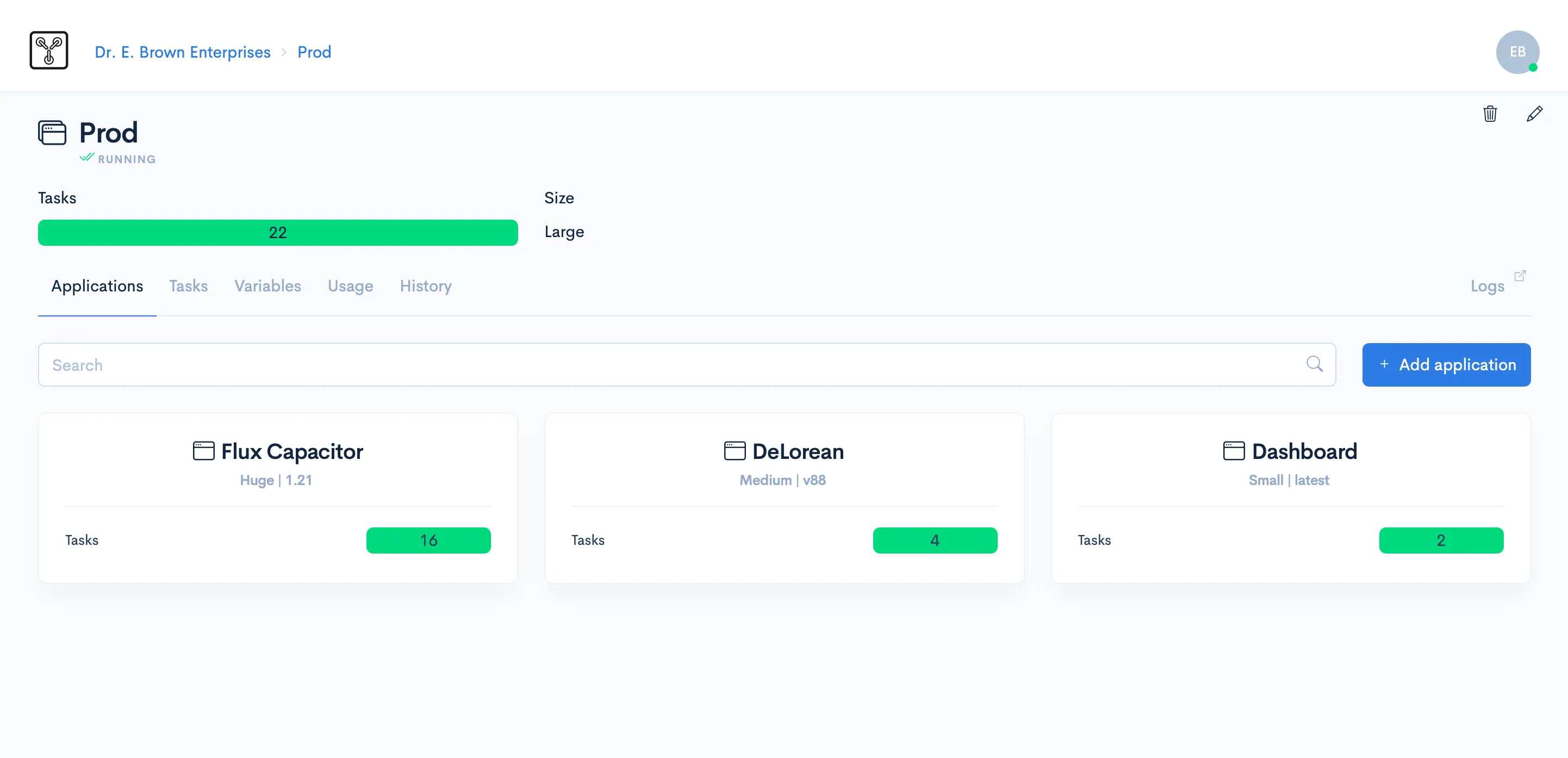
The dashboard already supports:
- ✅ Organization & cluster management
- ✅ App deployments and versioning
- ✅ Secrets and environment variables
- ✅ Logs, schedules, and web request inspection
- ✅ Usage metrics and message activity insights
- ✅ Multi-tenant routing and domain config
- ✅ User access control and invoicing
- ✅ Data backups and restores
Accessing your apps
Section titled “Accessing your apps”After deployment, your cluster immediately begins serving traffic. Each cluster has a default endpoint available at:
https://api.<cluster-id>.fluxzero.ioYou can configure custom domains from the dashboard.
What’s Coming Next
Section titled “What’s Coming Next”While many features are already live in the private beta, here’s a quick look at what’s on the way:
- Configure endpoints, routing, and tenants directly from the dashboard
- Roll back deployments with a single click
- Auto-scale trackers and applications
- Common admin queries and commands
These features will roll out soon—your cluster will support them automatically once available.
If you have questions or ideas, feel free to reach out.
© 2026 Fluxzero